
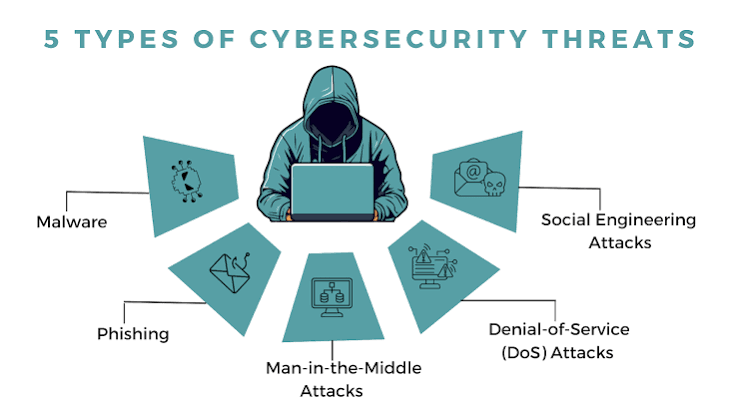
The internet has made everyday life faster, easier, and more connected than ever.
We use websites and apps to communicate, work, shop, study, pay bills, manage bank accounts, store photos, watch entertainment, and keep in touch with people around the world. But as our digital lives grow, so do the risks that come with being online.
Cybercriminals don’t only target large companies or technology experts. Ordinary internet users can also become targets of phishing scams, stolen passwords, malware, identity theft, fake websites, account takeovers, and online fraud.
The good news is that basic cybersecurity doesn’t have to be complicated.
You don’t need to be a computer expert to make your digital life safer. A few simple habits—such as using strong passwords, enabling multi-factor authentication, keeping software updated, recognizing suspicious messages, and protecting your personal information—can make a meaningful difference.
This guide explains the cybersecurity basics everyone should know and provides easy steps you can start using today.
What Is Cybersecurity?
Cybersecurity is the practice of protecting computers, smartphones, networks, applications, accounts, and information from unauthorized access, damage, theft, or misuse.
It covers many different areas, including:
- Password security
- Account protection
- Online privacy
- Malware prevention
- Phishing protection
- Network security
- Device security
- Data protection
- Identity theft prevention
Cybersecurity isn’t just something businesses need to worry about.
If you use the internet, cybersecurity affects you.
Why Cybersecurity Matters
Think about everything stored on your devices and online accounts.
Your smartphone might contain:
- Personal photographs
- Emails
- Text messages
- Banking apps
- Contacts
- Saved passwords
- Work information
- Location data
Your computer may contain important documents, financial records, and private files.
Your online accounts may contain payment information and personal details.
If an attacker gains access to one of these systems, the consequences can range from annoying to financially and personally serious.
That is why learning basic cybersecurity is worth the effort.
1. Create Strong, Unique Passwords
Passwords are still one of the most common ways people protect online accounts.
A strong password should be long, unpredictable, and unique.
CISA recommends using long, random, and unique passwords and suggests aiming for at least 16 characters. (cisa.gov)
Avoid passwords based on information such as:
- Your name
- Birthday
- Address
- Pet’s name
- Family member’s name
- Favorite team
- Phone number
Also avoid using the same password everywhere.
If one account is compromised, reused credentials could put your other accounts at risk.
2. Use a Password Manager
Managing dozens of unique passwords can be difficult.
A password manager can make the process much easier.
It can generate strong passwords and securely store them so you don’t have to memorize every credential.
The FTC recommends considering a password manager for creating and managing strong passwords. (consumer.ftc.gov)
Use a reputable password manager and protect it with a strong master password and multi-factor authentication where available.
3. Turn On Multi-Factor Authentication
Strong passwords are important, but they’re even better when combined with another security layer.
Multi-factor authentication (MFA) requires additional verification when you sign in.
This could be:
- An authenticator app
- A security key
- A verification code
- A device approval
- A fingerprint
- Facial recognition
The FTC recommends enabling two-factor authentication on important accounts that support it. (consumer.ftc.gov)
Start with your email, banking, work, cloud-storage, and social media accounts.
4. Protect Your Email Account
Your email account is often more important than you realize.
It may be connected to many other services.
If you forget a password, the reset link usually goes to your email.
This means someone who gains access to your email could potentially attempt to take over other accounts.
Use a unique password.
Enable MFA.
Review login activity.
Keep recovery information updated.
5. Learn How Phishing Works
Phishing is one of the most common online scams.
A phishing attack attempts to trick you into providing sensitive information or clicking a malicious link.
A message might appear to come from:
- Your bank
- A delivery company
- Your employer
- A government agency
- A social media platform
- A friend
- An online retailer
The message may create a sense of urgency.
For example:
“Your account will be closed today unless you verify your information.”
That pressure is intentional.
The FTC recommends being cautious with unexpected messages that request personal information or ask you to click links or open attachments. (consumer.ftc.gov)
6. Don’t Click Suspicious Links
One of the easiest cybersecurity habits is also one of the most effective:
Don’t click unexpected links without checking them first.
If a message claims there’s a problem with your bank account, don’t use the link in the message.
Open your banking app directly.
If a delivery company says you have a package problem, visit its official website yourself.
This simple habit can protect you from many phishing attacks.
7. Be Careful With Email Attachments
Unexpected attachments can contain malicious software.
Be particularly cautious with attachments from unknown senders or messages that seem unusual even if they appear to come from someone you know.
A compromised email account can sometimes send malicious messages to the person’s contacts.
If the message seems strange, contact the sender through another method before opening the attachment.
8. Keep Your Software Updated
Software updates aren’t just about new features.
They can also contain security fixes.
Keep your:
- Operating system
- Smartphone
- Web browser
- Applications
- Router
- Smart devices
updated whenever possible.
The FTC recommends keeping security software, browsers, operating systems, and applications updated and enabling automatic updates when practical. (consumer.ftc.gov)
9. Use Security Software
Modern operating systems include built-in security protections.
Make sure these features are enabled and up to date.
Depending on your device and needs, reputable security software can provide additional protection against malware and other threats.
However, be careful when downloading security tools.
Fake antivirus applications and security alerts can themselves be scams.
Always verify the developer before installing software.
10. Download Apps Carefully
Don’t download applications from random websites or links sent through messages.
Whenever possible, use official app marketplaces or legitimate developer websites.
Before installing an unfamiliar app, check:
- Developer name
- Reviews
- Number of downloads
- Update history
- Requested permissions
- Whether the application is legitimate
If an app requests access that doesn’t make sense, stop and investigate.
11. Review App Permissions
Applications may request access to your:
- Camera
- Microphone
- Location
- Contacts
- Photos
- Files
- Bluetooth
Some permissions are necessary.
Others may not be.
Review your permissions regularly and remove access that isn’t necessary.
12. Protect Your Smartphone
Your smartphone is effectively a small computer that you carry everywhere.
Protect it with:
- A strong screen lock
- Automatic updates
- Trusted applications
- Device-finding features
- Secure account credentials
- Regular backups
Don’t leave an unlocked phone unattended in public.
13. Secure Your Home Wi-Fi
Your home Wi-Fi network connects many devices to the internet.
Secure your router by:
- Changing default administrator credentials.
- Using a strong Wi-Fi password.
- Enabling modern wireless security.
- Installing firmware updates.
- Reviewing connected devices.
If your router supports automatic updates, consider enabling them.
14. Be Careful on Public Wi-Fi
Public Wi-Fi can be useful at airports, hotels, restaurants, libraries, and cafes.
But don’t automatically trust every network.
Before connecting, verify the network name.
Avoid entering highly sensitive information on unfamiliar networks when possible.
For particularly sensitive activities, consider using cellular data or a trusted connection.
15. Back Up Important Files
Cybersecurity isn’t only about stopping attacks.
It’s also about being prepared if something goes wrong.
Back up important:
- Photos
- Documents
- Contacts
- Work files
- Personal records
A backup can help if your device is lost, damaged, stolen, or affected by malicious software.
Keep important backups protected and make sure you know how to restore them.
16. Protect Your Personal Information
Don’t give personal information to websites, apps, or people unless you know why it’s needed.
Sensitive information can include:
- Social Security numbers
- Bank account details
- Credit card information
- Passwords
- Identification documents
- Home address
- Phone number
If someone unexpectedly asks for sensitive information, stop and verify the request.
17. Be Careful on Social Media
Social media can reveal more information than you realize.
Avoid publicly sharing:
- Your exact address
- Phone number
- Travel plans
- Financial information
- Identification documents
- Private family details
- Your daily routine
Scammers can use publicly available information to create convincing messages.
Review your privacy settings regularly.
18. Watch Out for Fake Websites
Scammers can create websites that look remarkably similar to legitimate businesses.
Before entering sensitive information, check the website address.
Look for unusual spellings, strange domains, or unexpected redirects.
Remember that a website using HTTPS isn’t automatically trustworthy.
HTTPS helps encrypt communication, but scammers can also operate websites using HTTPS.
19. Don’t Trust Urgency
One of the biggest warning signs of an online scam is pressure.
A scammer may say:
- “Act immediately.”
- “Your account will be closed.”
- “Send money now.”
- “Don’t tell anyone.”
- “You have only five minutes.”
Take a step back.
Legitimate organizations generally don’t require you to make important financial or security decisions under unexplained pressure.
Verify first.
20. Never Share Verification Codes
If someone asks for a login verification code, don’t give it to them.
Scammers may already have your username and password and need the code to complete the login.
Treat verification codes like passwords.
Keep them private.
21. Be Careful With Online Shopping
Before buying from an unfamiliar online store, research the company.
Be cautious about websites offering prices that seem too good to be true.
Check:
- Company information
- Contact details
- Return policy
- Reviews from independent sources
- Payment options
Don’t let a huge discount pressure you into making a purchase before verifying the seller.
22. Protect Your Financial Accounts
Banking and financial accounts should receive some of your strongest security protections.
Use:
- Strong unique passwords
- MFA
- Account alerts
- Updated devices
- Secure networks
Check your financial statements regularly.
Report suspicious transactions quickly.
23. Monitor Your Online Accounts
Don’t wait for a major problem before checking account activity.
Look for:
- Unknown logins
- Password changes
- New devices
- Unexpected purchases
- Messages you didn’t send
- Changes to recovery information
Many services provide security dashboards where you can review recent activity.
Use them.
24. Remove Old Accounts
You may have created dozens of accounts over the years.
Some may no longer be useful.
Old accounts can still contain personal information.
Delete accounts you no longer need when possible.
For accounts you keep, make sure the passwords and security settings are current.
25. Be Careful With USB Drives
Unknown USB drives can pose security risks.
Don’t connect an unfamiliar USB device to your computer simply because you found it somewhere or someone gave it to you unexpectedly.
Use trusted storage devices.
26. Secure Your Work Accounts
If you work remotely, cybersecurity becomes especially important.
Use company-approved devices and software when possible.
Don’t share work passwords.
Don’t upload confidential business documents to unauthorized services.
Keep work and personal accounts separate where practical.
27. Protect Children Online
Children spend more time online than ever.
Teach them basic cybersecurity principles.
Explain that they shouldn’t share:
- Passwords
- Home addresses
- Phone numbers
- School details
- Private photographs
- Family financial information
Encourage them to ask an adult when they encounter something suspicious.
28. Be Careful With AI Tools
AI tools are becoming part of everyday work and communication.
They can be incredibly useful, but you should think carefully about what information you provide.
Avoid entering confidential information into an AI service unless you understand how the service handles that data.
Don’t paste:
- Passwords
- Financial records
- Confidential company information
- Private legal documents
- Sensitive personal information
Use AI responsibly, just as you would any other online service.
29. Understand Identity Theft
Identity theft occurs when someone uses your personal information without permission, often for financial gain or other fraudulent purposes.
Warning signs can include:
- Unexpected bills
- Unknown accounts
- Unfamiliar transactions
- Credit inquiries you don’t recognize
- Unexpected account notifications
If you suspect identity theft in the United States, IdentityTheft.gov provides recovery guidance from the FTC. (identitytheft.gov)
30. Have a Simple Cybersecurity Routine
Cybersecurity becomes easier when it becomes a habit.
Once a month, spend a few minutes checking:
- Account activity
- Software updates
- App permissions
- Password security
- Device backups
- Privacy settings
You don’t need to spend hours.
Consistency matters more than complexity.
Common Cybersecurity Mistakes to Avoid
Many online security problems come from simple mistakes.
Avoid:
- Reusing passwords.
- Clicking unexpected links.
- Ignoring software updates.
- Downloading unknown apps.
- Sharing verification codes.
- Using unsecured Wi-Fi for sensitive tasks.
- Giving apps unnecessary permissions.
- Oversharing on social media.
- Ignoring security alerts.
- Trusting urgent requests without verification.
A Simple Cybersecurity Checklist
Use this quick checklist to improve your online safety:
Passwords
- Use long, unique passwords.
- Consider a password manager.
- Don’t reuse important passwords.
- Enable MFA.
Devices
- Install updates.
- Use a screen lock.
- Enable device-finding features.
- Back up important data.
Browsing
- Check website addresses.
- Avoid suspicious links.
- Don’t download unknown files.
- Be cautious with pop-ups.
Privacy
- Review app permissions.
- Limit public personal information.
- Check social media privacy settings.
- Delete unused accounts.
Scam Protection
- Question unexpected requests.
- Don’t share verification codes.
- Verify messages independently.
- Don’t let anyone pressure you into paying or clicking.
What to Do If You Think You’ve Been Hacked
If you suspect an account or device has been compromised, act quickly.
Change the affected password.
If you reused that password elsewhere, change those passwords too.
Enable MFA.
Sign out of unfamiliar devices.
Check account activity.
Run appropriate security checks on your device.
If financial information is involved, contact your bank or financial institution.
If you believe you’ve experienced identity theft or fraud, report it through the appropriate official channels.
The faster you respond, the better.
Cybersecurity Doesn’t Have to Be Complicated
One reason people avoid cybersecurity is that it sounds technical.
Terms like malware, encryption, authentication, ransomware, phishing, and credential stuffing can seem intimidating.
But you don’t need to understand every technical detail to protect yourself.
Think of cybersecurity like home security.
You don’t need to understand how a lock is manufactured to use one.
You simply need to lock your door, protect your keys, and avoid giving strangers access.
Digital security works in a similar way.
Strong passwords are locks.
MFA is an additional security barrier.
Software updates repair weaknesses.
Backups help you recover after a problem.
Cybersecurity awareness helps you recognize suspicious visitors.
The Future of Personal Cybersecurity
As technology develops, online threats will continue to change.
Artificial intelligence can help security teams identify suspicious activity, but criminals can also use AI to create more convincing scams.
Passkeys may gradually reduce dependence on traditional passwords.
Biometric authentication can make logging into devices easier.
Automated security updates can protect users without requiring them to become technical experts.
Despite these developments, basic cybersecurity habits will remain important.
Technology can provide powerful protection, but users still need to make careful decisions.
Conclusion
Cybersecurity may sound complicated, but staying safer online often starts with surprisingly simple habits.
Use strong, unique passwords.
Enable multi-factor authentication.
Keep your devices and applications updated.
Be cautious with links and attachments.
Download software from trusted sources.
Review app permissions.
Secure your home Wi-Fi.
Back up important files.
Protect your personal information.
Watch your accounts for suspicious activity.
Most importantly, slow down when something online feels urgent or unusual.
Scammers often rely on people reacting quickly.
Taking a few seconds to verify a message can prevent a serious mistake.
The internet will continue to play a major role in our lives, and cybersecurity will become increasingly important alongside it.
You don’t need to become a cybersecurity professional.
You simply need to develop good digital habits and use the security tools already available to you.
Small steps can create a much stronger layer of protection.
Start today, keep your habits consistent, and make cybersecurity a normal part of using the internet.
Frequently Asked Questions About Cybersecurity Basics
What is cybersecurity in simple terms?
Cybersecurity is the practice of protecting your devices, accounts, networks, and personal information from unauthorized access, scams, malware, and other online threats.
Why is cybersecurity important?
Cybersecurity helps protect your money, identity, personal information, accounts, devices, and digital files from theft, fraud, and unauthorized access.
What is the easiest way to improve cybersecurity?
Start by using strong unique passwords, enabling MFA, keeping software updated, avoiding suspicious links, and downloading applications only from trusted sources.
How strong should a password be?
CISA recommends using long, random, and unique passwords and suggests aiming for at least 16 characters. (cisa.gov)
Should I use a different password for every account?
Yes. Unique passwords help prevent one compromised account from putting your other accounts at risk.
What is multi-factor authentication?
MFA requires more than one method of verifying your identity when you sign in. It may involve a password plus an authenticator app, security key, verification code, or biometric method.
How can I recognize a phishing scam?
Be suspicious of unexpected messages that create urgency, request sensitive information, ask you to click a link, or tell you to open an attachment. Verify the request independently before taking action. (consumer.ftc.gov)
Is public Wi-Fi dangerous?
Public Wi-Fi isn’t automatically dangerous, but you should use caution. Verify the network and avoid unnecessary sensitive activities on unfamiliar networks.
Why are software updates important for cybersecurity?
Software updates can include security fixes that address known vulnerabilities. Keeping your operating system, applications, and browsers updated can reduce exposure to known security problems. (consumer.ftc.gov)
Should I install antivirus software?
Modern operating systems often include built-in security protections. Additional reputable security software may be useful depending on your device and circumstances, but research any security application before installing it.
How can I protect my smartphone?
Use a strong screen lock, install updates, download apps from trusted sources, review permissions, enable device-finding features, and secure your important accounts with strong authentication.
What should I do if I click a suspicious link?
Don’t provide additional information. If you entered a password, change it immediately and change it anywhere else you reused it. Enable MFA and monitor the affected account for suspicious activity.
Can scammers steal information through text messages?
Yes. Text messages can contain phishing links or requests for sensitive information. Treat unexpected texts with the same caution as suspicious emails.
Should I share a verification code?
No. Verification codes should generally remain private. Someone asking for your code may be attempting to gain access to your account.
How can I protect my online banking?
Use a strong unique password, MFA, updated devices, account alerts, and trusted networks. Access your bank through its official app or website rather than links in unexpected messages.
How can I protect my personal information?
Share only information that is necessary, review privacy settings, limit app permissions, avoid oversharing publicly, and verify who is requesting sensitive information.
What is identity theft?
Identity theft occurs when someone uses another person’s personal information without permission, often for fraud or financial gain.
What should I do if I think my identity has been stolen?
Act quickly by securing affected accounts, contacting financial institutions where appropriate, monitoring your accounts, and using official identity-theft recovery resources such as IdentityTheft.gov in the United States. (identitytheft.gov)
Can AI be used in cyberattacks?
Yes. AI can potentially help criminals create convincing phishing messages, automate certain activities, or improve social-engineering attempts. At the same time, cybersecurity professionals use AI to detect threats and improve defenses.
Do I need to be a technology expert to stay safe online?
No. Basic habits such as strong passwords, MFA, software updates, cautious browsing, and careful handling of personal information can provide meaningful protection.
How often should I check my cybersecurity settings?
Review them periodically, particularly after installing new apps, changing devices, creating important accounts, receiving security alerts, or learning that a service you use has experienced a breach.