
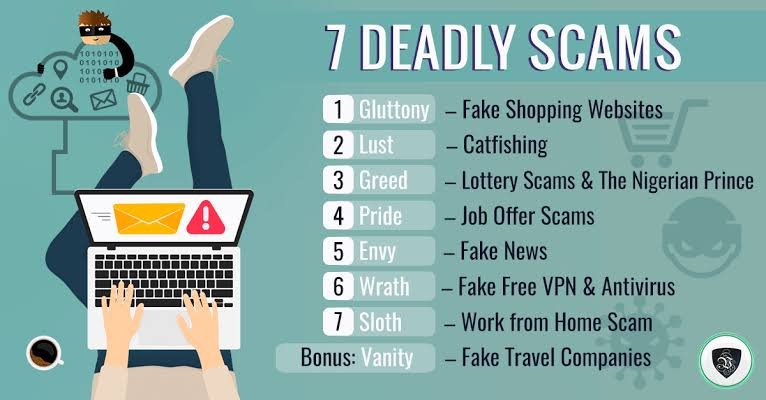
The internet has made it easier than ever to shop, communicate, work, manage money, and connect with people around the world. Unfortunately, it has also created new opportunities for scammers.
Online scams are becoming more convincing. A fraudulent message may look like it came from your bank. A fake shopping website may look almost identical to a legitimate store. Someone may even call you pretending to be a government official, technology company, employer, or family member.
Scammers often use the same basic strategy: create trust, create urgency, and convince you to take an action before you have time to think.
The good news is that you can reduce your risk by learning how common scams work and recognizing the warning signs.
In this guide, we’ll explain the most common online scams, how scammers operate, and the simple steps you can take to protect yourself.
What Is an Online Scam?
An online scam is a fraudulent attempt to trick someone into giving away money, personal information, account access, or something else of value.
Scammers may contact people through:
- Text messages
- Social media
- Phone calls
- Dating apps
- Online marketplaces
- Fake websites
- Messaging apps
- Pop-up advertisements
- Search results
Some scams target thousands of people with the same message. Others are highly personalized and designed specifically for one person or organization.
The technology may change, but the underlying goal is usually the same: get you to trust the scammer long enough to give them what they want.
1. Phishing Scams
Phishing is one of the most common types of online fraud.
A phishing scam usually involves a message pretending to come from a legitimate organization.
For example, you might receive an email claiming to be from your bank:
“We detected unusual activity. Click here to verify your account.”
The link may lead to a fake website designed to steal your username and password.
Phishing messages can also pretend to come from:
- Delivery companies
- Streaming services
- Government agencies
- Employers
- Social media platforms
- Online retailers
- Financial institutions
The FTC warns consumers to be cautious with unexpected messages asking them to click links, open attachments, or provide sensitive information. (consumer.ftc.gov)
How to Avoid Phishing
Don’t click unexpected links.
Instead, visit the organization’s official website directly or contact it using a phone number you already know is legitimate.
Pay attention to urgency, unusual requests, suspicious addresses, and unexpected attachments.
2. Fake Shopping Websites
Online shopping scams can be difficult to spot because fake stores can look professional.
A scam website may advertise popular electronics, clothing, shoes, furniture, or other products at surprisingly low prices.
After you pay, one of several things may happen:
- The product never arrives.
- You receive a counterfeit product.
- You receive something completely different.
- Your payment information is stolen.
- The website disappears.
Warning Signs of a Fake Store
Be cautious when a website:
- Offers prices that seem too good to be true.
- Has little information about the company.
- Uses suspicious payment methods.
- Contains numerous spelling or grammatical errors.
- Has copied product descriptions.
- Pressures you to buy immediately.
- Has no reliable customer-service information.
Before purchasing from an unfamiliar store, research the company independently.
3. Online Marketplace Scams
Marketplaces can connect buyers and sellers quickly, but scammers also use them to target users.
A seller might advertise an expensive product at an unusually low price.
They may then ask you to communicate outside the marketplace or pay using an unusual method.
Another common tactic involves a fake buyer.
Someone may claim they accidentally paid too much and ask you to refund the difference.
How to Stay Safe
Keep communication and payments within the platform whenever possible.
Don’t send money through unfamiliar payment methods simply because a buyer or seller asks you to.
Be especially cautious when someone creates a sense of urgency.
4. Tech Support Scams
Imagine a pop-up suddenly appearing on your computer saying:
“WARNING! Your computer is infected. Call this number immediately.”
This could be a tech support scam.
The scammer may pretend to be from a technology company and claim your computer has a serious security problem.
They may ask you to:
- Install remote-access software.
- Give them control of your computer.
- Pay for unnecessary services.
- Provide passwords.
- Give them financial information.
Legitimate technology companies generally don’t randomly call you to announce that your computer has been infected.
How to Avoid Tech Support Scams
Don’t call phone numbers displayed in unexpected security pop-ups.
Close the window and use your device’s legitimate security tools.
If you’re concerned about a computer problem, contact the manufacturer or a trusted professional through an official website.
5. Romance Scams
Romance scams target people through dating websites, social media, and messaging platforms.
The scammer creates a fake identity and develops an emotional relationship with the victim.
After gaining trust, they may claim they have an emergency and need money.
Common stories include:
- A medical emergency
- Travel problems
- A stolen wallet
- A business problem
- A family crisis
- An urgent legal issue
The scammer may repeatedly ask for money while promising to repay it later.
Warning Signs
Be cautious if an online romantic interest:
- Quickly becomes extremely affectionate.
- Avoids meeting in person or video calling.
- Has excuses for why they can’t meet.
- Claims to live far away.
- Asks for money.
- Requests gift cards or cryptocurrency.
- Wants financial information.
Never send money to someone you’ve only met online because of an emotional emergency.
6. Investment and Cryptocurrency Scams
Investment scams can cause enormous financial losses.
Scammers may promise guaranteed profits, secret investment opportunities, or unusually high returns.
Cryptocurrency is sometimes used because transactions can be difficult to reverse.
A scammer might show fake account balances or fabricated investment results to convince victims that their money is growing.
Eventually, the scammer demands additional payments to “unlock” the money.
How to Protect Yourself
Be skeptical of guaranteed returns.
Research investment opportunities independently.
Don’t make financial decisions solely because someone contacted you through social media or a messaging app.
If an investment opportunity sounds unbelievably profitable, stop and investigate before sending money.
7. Government Impersonation Scams
Scammers sometimes pretend to represent government agencies.
They may claim you owe money, committed an offense, or need to provide information.
The scammer may threaten:
- Arrest
- Fines
- Legal action
- Loss of benefits
- Immigration consequences
- Account suspension
The goal is to frighten you into paying immediately.
What to Do
Don’t assume a caller is legitimate simply because they know your name or some personal information.
Government agencies can be impersonated.
If you receive an unexpected government-related request, independently find the agency’s official contact information and verify the claim.
8. Bank and Financial Scams
A scammer may pretend to be from your bank and claim there has been suspicious activity.
They might ask you to confirm:
- Your account number
- Password
- Debit card information
- Security code
- Verification code
Some scammers may even tell you to transfer your money to a “safe account.”
That is a major warning sign.
Remember
Your bank should not require you to move money to a stranger’s account simply to protect it.
If you’re concerned about a financial account, contact your bank using the official number on your card or statement.
9. Fake Delivery Scams
Package-delivery scams have become extremely common.
You may receive a text saying:
“Your package could not be delivered. Pay a small fee to reschedule.”
The link may lead to a fake website designed to steal payment information.
Scammers often use current shopping habits to make these messages seem believable.
How to Avoid Delivery Scams
If you’re expecting a package, check its status through the retailer or delivery company’s official website or app.
Don’t automatically trust a link in an unexpected text message.
10. Job and Employment Scams
Job scams target people looking for employment or additional income.
A fake recruiter may offer a job that sounds unusually easy and well-paid.
They might then ask you to:
- Pay an application fee.
- Purchase equipment from them.
- Deposit a check.
- Send money back.
- Provide sensitive financial information.
- Move the conversation to an unusual messaging platform.
A legitimate employer generally shouldn’t require you to send money simply to get a job.
Warning Signs
Be cautious about offers involving unusually high salaries, vague job descriptions, pressure to act immediately, or requests for money.
Research the employer independently before sharing sensitive information.
11. Fake Prize and Lottery Scams
You receive a message:
“Congratulations! You’ve won $50,000!”
There’s just one problem.
You never entered the contest.
The scammer may claim you need to pay taxes, processing fees, shipping costs, or other charges before receiving your prize.
Don’t pay money to claim a prize you didn’t enter.
Unexpected winnings should always be treated with suspicion.
12. Social Media Account Scams
Social media accounts can be targeted in several ways.
A scammer may send a message pretending to be a friend.
For example:
“Hey, can you help me? I’m locked out of my account.”
They might ask for a verification code.
If you provide it, they may use the code to take over your account.
Another scam involves fake account warnings:
“Your account violates our rules. Click here to appeal.”
The link may lead to a phishing website.
Protect Your Social Media Accounts
Use a strong, unique password.
Enable multi-factor authentication.
Don’t share login or verification codes.
Be cautious about unexpected messages, even if they appear to come from friends.
13. Business Email Compromise Scams
Business email compromise, or BEC, is particularly dangerous for organizations.
A criminal may impersonate a company executive, supplier, employee, or business partner.
They may request a wire transfer or payment to a new bank account.
The email can appear completely legitimate.
How Businesses Can Reduce the Risk
Create procedures requiring verification for financial changes.
Don’t approve large payments based solely on email instructions.
Confirm unusual requests through another communication channel.
For example, call the person using a trusted phone number rather than replying to the suspicious email.
14. Charity Scams
Scammers often exploit people’s generosity.
They may create fake charities or impersonate legitimate organizations, especially after:
- Natural disasters
- Major emergencies
- Public tragedies
- International crises
Before donating, research the organization independently.
Avoid donating simply because someone sends you an emotional message with an urgent payment request.
15. Fake Invoice Scams
Businesses and individuals can receive fake invoices for services they never purchased.
A scammer may send a professional-looking invoice and claim immediate payment is required.
Before paying, verify:
- Who sent the invoice?
- Did you actually order the service?
- Is the payment information correct?
- Has the bank account changed?
- Can you confirm the request independently?
Never assume an invoice is legitimate just because it looks professional.
16. “Your Account Will Be Closed” Scams
Scammers know that people worry about losing access to important accounts.
They may send messages saying:
“Your account will be permanently deleted today.”
The message then provides a link to “verify” your account.
The goal is to steal your credentials.
Don’t let fear push you into clicking.
If you’re worried, open the official app or website yourself and check your account status.
17. QR Code Scams
QR codes are convenient, but criminals can also use them maliciously.
A fake QR code can direct you to a phishing website or payment page.
Be cautious about QR codes placed over legitimate ones, especially in public locations.
Before submitting sensitive information after scanning a QR code, check the website address carefully.
18. AI-Powered Scams
Artificial intelligence is making some scams more convincing.
Criminals can potentially use AI to create realistic messages, images, and voice impersonations.
A scammer might imitate the writing style of someone you know or create a convincing voice message.
This means you shouldn’t assume something is legitimate simply because it looks or sounds real.
If a message involves an unusual financial request, verify it independently.
For example, if someone claiming to be a family member urgently asks for money, call them directly using a number you already know.
19. Fake Customer Support Accounts
Scammers sometimes create fake customer-service profiles on social media.
A person might publicly complain about a company.
A fake support account then responds:
“Send us your account details so we can fix this.”
The goal is to collect sensitive information.
When contacting customer support, use the company’s official website or official app whenever possible.
20. How to Recognize an Online Scam
Although scams vary, many share the same warning signs.
Be cautious when someone:
- Creates extreme urgency.
- Promises guaranteed money.
- Requests payment through unusual methods.
- Asks for passwords.
- Requests verification codes.
- Wants sensitive information immediately.
- Tells you to keep the conversation secret.
- Threatens you.
- Offers something that seems too good to be true.
- Asks you to move communication away from a trusted platform.
One warning sign doesn’t necessarily prove something is fraudulent.
Several warning signs together should make you stop and investigate.
The “Stop, Check, Think” Method
One of the easiest ways to protect yourself is to develop a simple routine.
Stop
Don’t immediately click, pay, reply, or provide information.
Check
Verify who contacted you and whether the request is legitimate.
Think
Ask yourself:
Was I expecting this?
Why do they need this information?
Why are they rushing me?
Can I verify the request another way?
This simple pause can prevent many scams.
Never Let a Scammer Rush You
Urgency is one of the most powerful tools scammers use.
They want you to make a decision before you have time to think.
A legitimate problem can usually be verified.
If someone tells you that you have only minutes to send money or provide information, stop.
Take a breath.
Close the message.
Call the organization independently.
Talk to someone you trust.
A few minutes of verification can save you thousands of dollars.
How to Protect Your Accounts
Good account security can limit the damage if your information is targeted.
Use:
- Strong passwords
- Unique passwords for important accounts
- Multi-factor authentication
- Updated software
- A reputable password manager
- Security alerts
Pay particular attention to your email account because it can be used to reset passwords for other services.
What to Do If You Fall for a Scam
If you realize you’ve been scammed, don’t be embarrassed.
Scammers are professionals at manipulation.
Act quickly.
Step 1: Stop Communicating
Don’t send additional money or information.
Step 2: Secure Your Accounts
Change compromised passwords.
If you reused the same password elsewhere, change those accounts too.
Enable multi-factor authentication.
Step 3: Contact Your Bank
If you sent money or shared financial information, contact your bank or payment provider immediately.
Ask what options are available to protect your account.
Step 4: Monitor Your Accounts
Watch for suspicious transactions or unexpected login activity.
Step 5: Report the Scam
In the United States, the FTC provides guidance for reporting scams and identity theft through its official consumer-protection resources. (consumer.ftc.gov)
Reporting scams can help authorities identify patterns and warn other consumers.
How Parents Can Help Children Avoid Online Scams
Children and teenagers spend significant amounts of time online.
Talk to them about:
- Suspicious links
- Fake giveaways
- Stranger messages
- Account takeovers
- Online shopping scams
- Requests for private information
Encourage children to tell a trusted adult if something online makes them uncomfortable or confused.
The goal isn’t to frighten them.
It’s to teach them that asking questions is always okay.
How Older Adults Can Stay Safe Online
Older adults can be targeted by financial, romance, investment, and government impersonation scams.
Family members can help by discussing common scam tactics without being judgmental.
Create a simple rule:
If someone unexpectedly asks for money or sensitive information, stop and talk to someone you trust before doing anything.
This simple habit can prevent serious financial losses.
Online Scam Prevention Checklist
Use this quick checklist to improve your online safety:
- Use strong, unique passwords.
- Enable multi-factor authentication.
- Don’t share verification codes.
- Avoid clicking unexpected links.
- Verify unusual requests independently.
- Don’t send money to strangers.
- Be cautious with cryptocurrency investments.
- Research unfamiliar online stores.
- Don’t trust caller ID alone.
- Keep your software updated.
- Review financial accounts regularly.
- Limit sensitive information shared online.
- Be careful with QR codes.
- Don’t allow strangers remote access to your computer.
- Talk to someone you trust when something feels suspicious.
The Biggest Lesson About Online Scams
The most important thing to remember is that scams are designed to create an emotional reaction.
They may make you feel:
- Afraid
- Excited
- Curious
- Angry
- Confused
- Pressured
- Hopeful
Once emotions take over, people are more likely to act without checking the facts.
That’s why the best defense is often surprisingly simple:
Slow down.
You don’t have to answer immediately.
You don’t have to click immediately.
You don’t have to pay immediately.
You can stop and verify.
Conclusion
Online scams are constantly changing, but many of them rely on familiar tricks.
Scammers impersonate trusted organizations.
They create urgency.
They promise rewards.
They threaten consequences.
They build emotional relationships.
They ask for money or personal information.
The best way to protect yourself is to understand these patterns and develop good digital habits.
Use strong passwords and multi-factor authentication.
Be careful with unexpected emails and text messages.
Never share verification codes.
Research unfamiliar websites before making purchases.
Verify financial requests independently.
Don’t allow strangers remote access to your computer.
Be cautious about investment opportunities and online relationships.
And remember that legitimate organizations generally give you ways to verify important requests.
The internet can be incredibly useful, but you should never assume that everything you see online is genuine.
When something feels urgent, unexpected, or too good to be true, stop and check before you act.
That simple habit can be one of your strongest defenses against online scams.
Frequently Asked Questions About Online Scams
What is the most common online scam?
Phishing is one of the most common forms of online fraud. Phishing messages attempt to trick people into clicking malicious links, opening attachments, or sharing sensitive information. (consumer.ftc.gov)
How can I tell if a website is a scam?
Look for warning signs such as unusually low prices, suspicious website addresses, poor contact information, pressure to pay quickly, unusual payment methods, and a lack of independent reviews or company information.
What should I do if I receive a suspicious email?
Don’t click links or open unexpected attachments. If the message appears to come from a legitimate company, visit that company’s official website independently and contact it through a trusted channel.
Can scammers steal money through text messages?
Yes. Text-message scams can direct people to fake websites, request payments, or attempt to steal account credentials and financial information.
Should I trust a caller who knows my name?
No. Knowing your name or other basic information doesn’t prove that a caller is legitimate. Scammers may obtain personal information from public sources or previous data breaches.
Can scammers use artificial intelligence?
Yes. AI can potentially make fraudulent messages, impersonation attempts, images, and voice communications more convincing. Because of this, unusual requests should be independently verified even if they appear authentic.
What should I do if someone asks for my verification code?
Don’t provide it to someone who unexpectedly contacts you. Verification codes are intended to help confirm your identity, and scammers may attempt to use them to take over your account.
Are online investment opportunities safe?
Some are legitimate, but unsolicited investment opportunities promising guaranteed or unusually high returns should be treated with extreme caution. Research the investment independently before sending money.
How do I avoid romance scams?
Be cautious when an online romantic interest quickly develops a close relationship and then asks for money. Never send money simply because someone you’ve met online claims to have an emergency.
What should I do after giving a scammer my password?
Change the password immediately. If you used that password on other accounts, change those passwords as well. Enable multi-factor authentication and review recent account activity.
What if I gave a scammer my bank information?
Contact your bank or financial institution immediately. Explain what happened and ask what steps you should take to protect the account. Continue monitoring transactions for suspicious activity.
Can online scams happen on social media?
Yes. Social media can be used for phishing, fake giveaways, investment fraud, romance scams, impersonation, account takeovers, and fraudulent advertisements.
How can I protect older family members from scams?
Talk openly about common scams and create a simple rule: if someone unexpectedly asks for money, passwords, verification codes, or sensitive information, stop and consult a trusted person before taking action.
What is the best way to avoid online scams?
The best approach is a combination of awareness and good security habits. Use strong passwords, enable MFA, avoid suspicious links, verify unexpected requests, protect financial information, and never let someone pressure you into making a quick decision.
Where can I report an online scam in the United States?
The FTC provides consumer guidance and reporting resources for scams and fraud. If money or accounts are involved, you should also contact your bank, payment provider, or the relevant platform as quickly as possible.